
If Condition step
Run steps only when a condition is true, with an optional else branch.
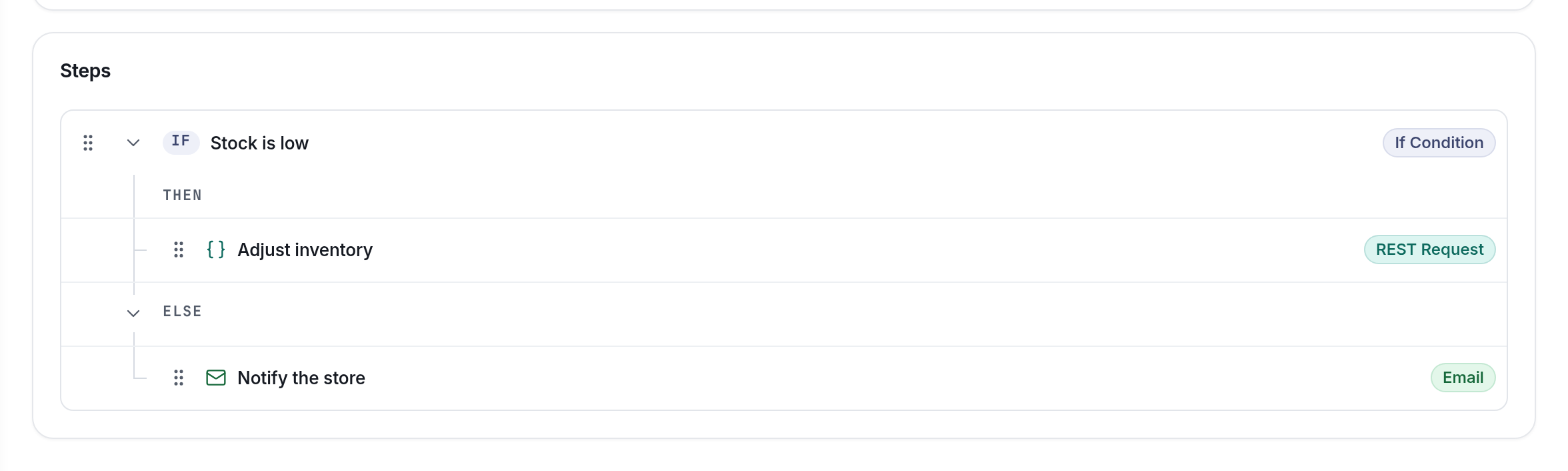
The If Condition step runs the steps in its THEN branch when a condition is true, and the steps in its ELSE branch otherwise. It's how a Glue job makes decisions: skip a sale that doesn't qualify, treat VIPs differently, or handle a failed call.
Set it up
| In the app | data field | What it does |
|---|---|---|
| If Condition | condition | A JavaScript expression with your variables on $, like $.sale.total_price > 500. |
| THEN branch | steps | Drag steps here. They run when the condition is exactly true. |
| ELSE branch | else_steps | Optional. Select Add else, then drag steps here. They run otherwise. |
How the condition works
- It must be exactly
true. Anything else (false,"yes",1,undefined) runs ELSE. Write$.send === true, not$.send. - Use JavaScript.
===,!==,>,<,&&,||,!and method calls all work:$.email && $.email.indexOf("@") > 0. - Use
$, not Liquid.{{ name }}doesn't work in a condition. - An error stops the run. If the expression throws (for example,
$.sale.total_pricewhen$.saleis undefined), the job fails. Guard with$.sale && $.sale.total_price > 500. - It has 60 seconds, like a Script step.
Branches can hold any steps, including more If Conditions, as deep as you need (up to the nesting limit in Creating Glue integrations).
Steps in a branch run again on a retryWhen a job is retried, API calls and emails inside an If Condition run again, even if they worked the first time. Keep writes inside a branch safe to repeat.
Example 1: Mark VIP customers
Trigger: System Hook, Update Customer.
-
Script: Read the customer
var p = JSON.parse($.default); $.customer = p.after || p; $.is_vip = ($.customer.total_spent || 0) > 1000; -
If Condition: If VIP, Condition
$.is_vip === true.- THEN: Script: Mark them as VIP,
$.tag = "vip";followed by the steps that send it on. - ELSE: Script: Mark them as regular,
$.tag = "regular";.
- THEN: Script: Mark them as VIP,
Example 2: Log good payloads, email about bad ones
Trigger: Webhook.
-
Script: Read the payload
var body = {}; try { body = JSON.parse($.default); } catch (e) {} $.should_log = typeof body.reference === "string" && body.reference !== ""; $.log_body = JSON.stringify({ category: "external_sales", message: "Sale " + body.reference }); -
If Condition: If the sale should be logged, Condition
$.should_log === true.- THEN: API Request: Create a log entry,
POST /log.json, Body{{ log_body }}. - ELSE: Email: Email the floor, to let someone know a bad payload came in.
- THEN: API Request: Create a log entry,
Tips
- Work it out in a script first. A condition like
$.send_event === true, with the logic in the Script step before it, is easier to read and test than a long expression. - An empty THEN is fine while you build, but remember to drag your steps into it. A step below the If Condition at the top level runs whatever the condition says.
- Log the decision.
console.log("vip?", $.is_vip)in the script shows up in the Console when you select Run.
Updated about 23 hours ago